Skip to content
chatmodel

How to use chatmodel (updated ) 4 min read

How to see your room in a new style with AI

Tired of the living room but not sure what you want? Upload a photo, choose a style, and chatmodel shows you the same room redecorated. Selling or renting a flat? Virtual Staging furnishes an empty room so buyers can picture living there.

By the chatmodel team, tested in the app Open it in chatmodel
Interior design in chatmodel: Image, Presets, Professional, upload the room, Minimalism and Cozy, Generate. Same walls, window and floor, new everything else.
What the video shows
  1. Opens Image in chatmodel and goes to the Presets tab.
  2. Chooses the Professional category and presses Interior design.
  3. Adds the photo with Upload.
  4. Leaves the choices as they are (Minimalism, Cozy) and presses Generate.
  5. The result appears. (Interior design: Reimagine any room in your favorite interior design style.)

Magazines and showrooms aren’t your room, with your window and your awkward corner. Upload a photo and see your own room in a new style.

How to redecorate a room with AI

You give Interior design three things:

Room photo The room as it is now, from your phone.
Style Minimalism, Modern, Scandinavian, Industrial, Boho, Classic, Japandi, Mid-century or Art deco.
Mood Cozy, Serene, Dramatic, Energetic or Romantic.

It keeps the walls, the windows and the floor, and changes the furniture, the colours and the decoration.

  1. Go to Image, open the Presets tab and choose Professional.
  2. Press Interior design. The button at the end of this page opens it directly.
  3. Add your Room photo, then choose a Style and a Mood.
  4. Press Generate.

How to photograph the room

Works well

  • Stand in a corner, phone at chest height
  • Daylight: curtains open, lights off
  • Horizontal for a living room, vertical for a narrow bedroom
  • Floor mostly clear

Avoid

  • A close-up of one wall
  • Dark evening light with lamps on
  • Piles of laundry or boxes on the floor
  • Wide-angle mode that bends the walls

Room makeover ideas

Before you buy a sofa See whether the room works better Scandinavian or Mid-century, then shop for that.
Before you paint Choose Serene or Cozy and see which wall colours come up.
A parent who's downsizing Show them the new, smaller flat furnished, so it feels like home before the move.
New keys, empty rooms Picture your new home lived in before the first box arrives.

How to furnish an empty room with AI: Virtual Staging

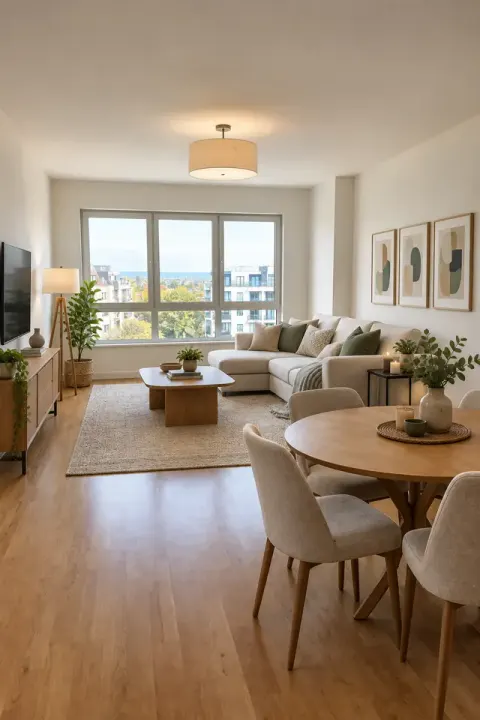
An empty room looks smaller and colder than it is. That’s why estate agents furnish flats before showing them. Virtual Staging, in the same Professional category, does it on the photo: upload a picture of the empty room and it furnishes it tastefully.
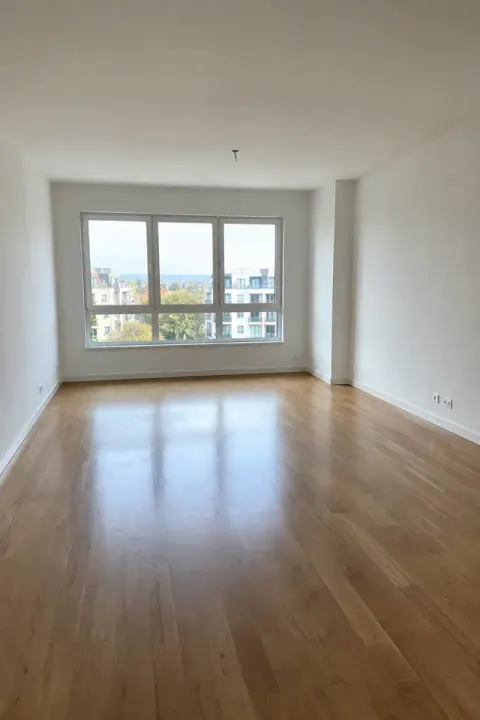
Your photo: Virtual Staging: an empty room, furnished. Your photo
In chatmodel: Virtual Staging: an empty room, furnished. In chatmodel
Virtual Staging: an empty room, furnished.

How to try one specific change in your room

A preset changes the whole room. To change one thing, describe it in Image with your photo attached, and say what to keep. More in how to edit a photo with AI.

New walls, new shelves

Paint the walls sage green and put a tall bookcase on the left wall. Keep everything else the same.

A new sofa and rug

Replace the sofa with a rust-coloured velvet one and add a round jute rug. Keep the walls, windows and floor the same.

If it doesn't come out right

It moved my window
The photo showed too little of the room. Take it from a corner, so walls and windows are clear.
It looks like a showroom, not a home
Try the Cozy mood, or a warmer style like Boho or Classic.
The furniture looks too big
The AI doesn't measure anything. Treat it as an idea and measure before you buy.
Frequently asked questions

Can AI redesign my room from a photo?

Yes. In chatmodel, open Image → Presets → Professional → Interior design, upload a photo of the room, choose a Style and a Mood, and press Generate.

Which styles are there?

Minimalism, Modern, Scandinavian, Industrial, Boho, Classic, Japandi, Mid-century and Art deco. You also choose a mood: Cozy, Serene, Dramatic, Energetic or Romantic.

Does it keep my room's layout?

It keeps the walls, windows and floor, and changes the furniture, colours and decoration. Treat it as an idea, not a plan: sizes aren't measured.

Can I use Virtual Staging in a property listing?

Many people do. Say in the listing that the furniture is virtual, so visitors aren't disappointed.

Is it free?

Presets need the Pro plan, which includes one picture a day. Studio gives you many more.

Keep reading

All of these models, in one place

Chat, images, video and tools with the best AI models. Switch between them whenever you want.

Start for free

Chatmodel is an independent service offering access to third-party AI models. AI can make mistakes. Using Chatmodel means you agree to our Terms and Privacy Policy.