Until November, Gemini 4 Argon was the only Gemini 4 in chatmodel. Now there are three: Gemini 4 Hydrogen and Gemini 4 Carbon have joined it.
What Gemini 4 Hydrogen and Carbon can do
On paper, the three are the same in chatmodel. They think before they answer, understand photos, read PDFs, help with code and can search the web. They can read a whole book at once. All three are marked Standard usage, so the same question uses the same share of your plan.
The differences show up in the answers. Over our 8 everyday tests:
- Gemini 4 Hydrogen wrote about 230 words an answer and took about 7 seconds.
- Gemini 4 Argon wrote about 330 words and took about 11.
- Gemini 4 Carbon wrote about 310 words and took about 24.
What their answers look like
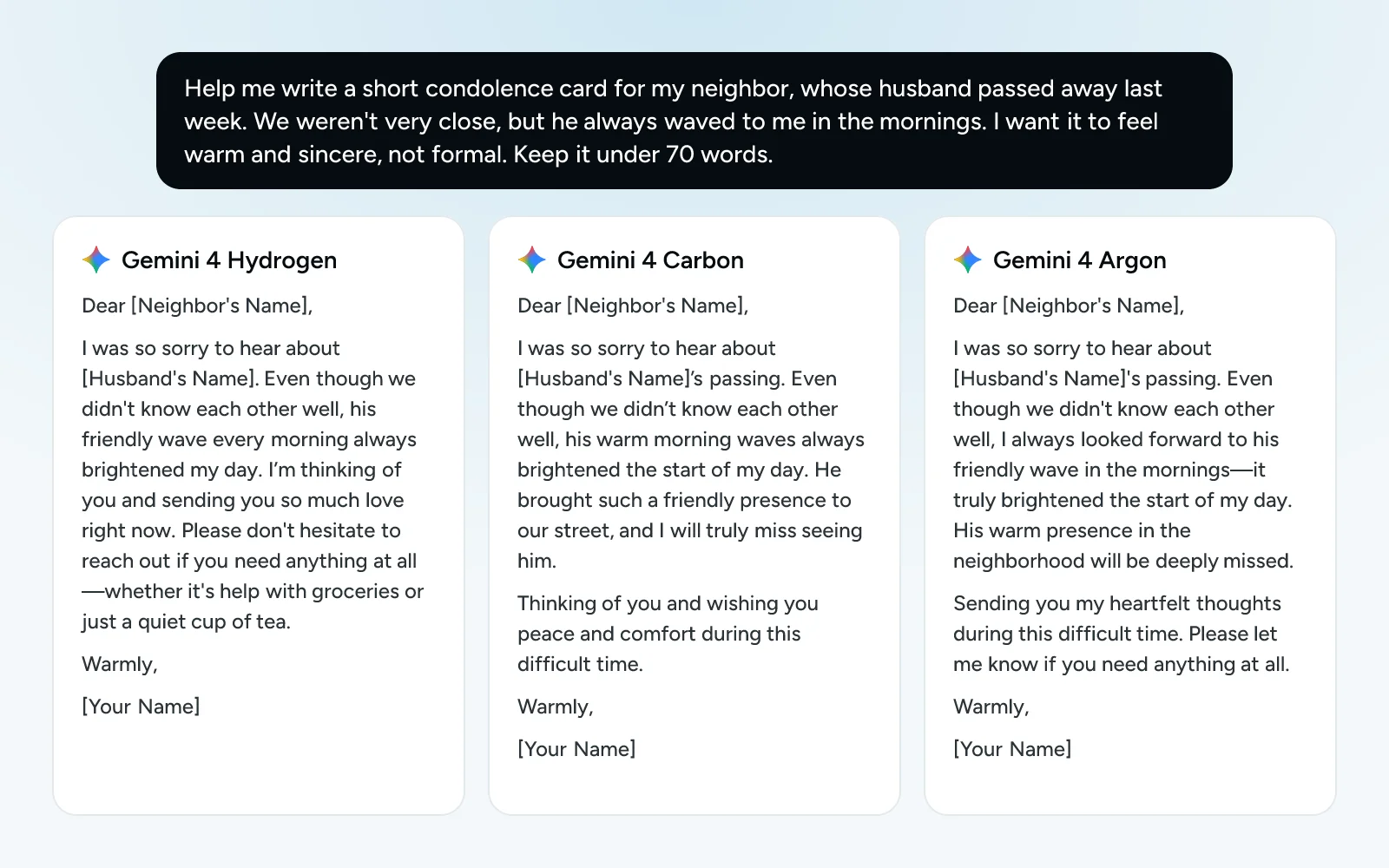
Asked for a short condolence card for a neighbour who always waved in the mornings, all three wrote a sincere card. Only Hydrogen offered something concrete:
Please don’t hesitate to reach out if you need anything at all—whether it’s help with groceries or just a quiet cup of tea.
Given a confusing letter from a health insurer, Hydrogen kept to what the letter says. It told us to wait for the bill from Riverside Imaging and check it:
When the bill from Riverside Imaging arrives, make sure the amount they are asking for is $412.00 (or less, if you already paid something at the office). If they try to charge you more than $412.00, call your insurance company.
Carbon and Argon both went further than the letter: they worked out a $1,000 yearly deductible it never states, and said $412 was the most we could be charged, which is only true when the provider is in your insurer’s network.
A limit we found
Hydrogen gives fewer extras. On a fake delivery email, all three gave the right address to report it, spam@uspis.gov, but only Argon added the number to forward scam texts to, 7726. If an answer feels thin, ask the follow-up.
Carbon’s limit is time. It took 42 seconds for a trip plan and 76 for a 210-word bedtime story. Hydrogen’s took 11 and 9.
How to pick Gemini 4 Hydrogen in chatmodel
- Open a chat. The model you’re talking to is named at the bottom of the message box.
- Press that name. The model list opens on Featured.
- Type Hydrogen in Search model… and pick Gemini 4 Hydrogen. You can also press Browse all models and find it, with Carbon and Argon, under Google.
- Write your message, or attach a photo or a PDF, and send it.
Which Gemini 4 to use
Start with Hydrogen for everyday questions: a letter, a card, a recipe, a simple plan. It won 4 of our 8 tests, and the other 4 were ties. Switch to Argon or Carbon when you want every tip spelled out and don’t mind reading more. All 8 tasks side by side are at Gemini 4 Hydrogen vs Carbon vs Argon. For how Gemini compares with ChatGPT and Claude, read ChatGPT vs Gemini and Claude vs Gemini.